
Introduction
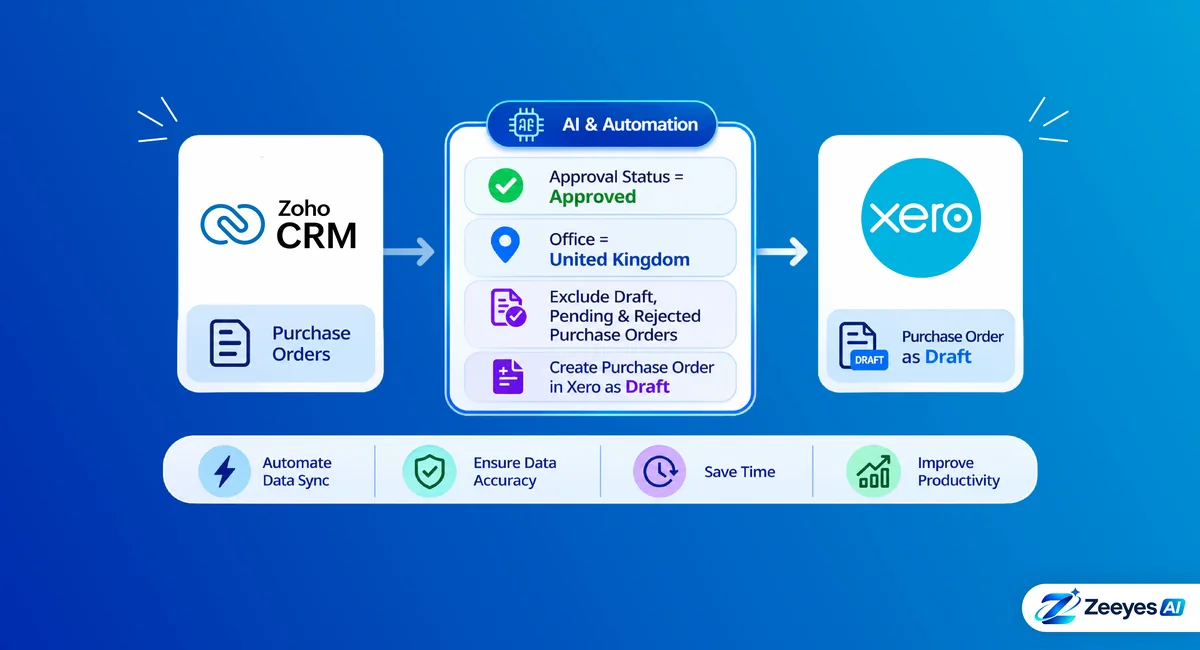
When purchase orders are raised in Zoho CRM and the accounts live in Xero, the two systems have to agree on which orders are ready for accounting. Sending every order creates clutter. Sending too few creates gaps.
This case study shows how Zeeyes AI built a workflow, using AI and automation, that syncs only the right purchase orders from Zoho CRM to Xero.
Client Overview
The client is an organisation with a United Kingdom office that runs Zoho CRM for purchase orders and Xero for accounting. Purchase orders go through an approval step in Zoho CRM before they are ready for finance.
Challenges
Teams that manage purchase orders in Zoho CRM and accounting in Xero often face these issues:
- Manual re-entryApproved purchase orders are typed into Xero again by hand.
- Unapproved orders reaching accountingDraft, pending or rejected orders can end up in Xero by mistake.
- Mixed officesOrders from several offices arrive in one Xero account, even when only one office should sync.
- No review stepOrders go straight into accounting without a finance check.
The Zeeyes AI Solution
We built an automated workflow from Zoho CRM to Xero for the Purchase Orders module, with clear rules at each step.
Pick up the purchase order
The workflow starts from a purchase order record in Zoho CRM.
Check the approval status
The order continues only when Approval Status is Approved. Draft, pending and rejected orders are not synced.
Check the office
The order continues only when Office is United Kingdom. Orders from other offices are not synced.
Create a draft in Xero
The purchase order is created in Xero as a draft, so the finance team can review it first.
What syncs and what does not
Results
- Approved United Kingdom purchase orders appear in Xero as drafts without re-typing.
- Draft, pending and rejected purchase orders are never sent to Xero.
- Purchase orders from other offices are left out of the sync.
- The finance team reviews each draft in Xero before it is finalised.
Key Benefits
Clean accounting data
Only approved purchase orders reach Xero.
Office-level control
Each office’s data goes only where it should.
Finance stays in control
Drafts are reviewed in Xero before they are finalised.
No manual re-entry
Approved orders are created in Xero automatically.
Takeaway
A sync works best when the rules are clear. Here, two conditions (Approved and United Kingdom) decide which purchase orders move, and a draft step keeps finance in control.
Conclusion
This case study shows how Zeeyes AI uses AI and automation to connect Zoho CRM and Xero around a company’s own approval rules. If your team re-enters purchase orders by hand, or needs to control which records reach accounting, a similar workflow can help. Xapplets is our own product for connecting Zoho CRM with business apps such as Xero.
